How to Care for Your Metal NFC Card — and Why Your QR Code Design Matters Too (2026 Guide)
Introduction
You’ve invested in a premium metal NFC business card. It’s custom designed, laser engraved, and represents your brand at the highest level. It’s also — let’s be honest — something you’ll be handing to important people for the next several years.
The question nobody asks when they order: how do I keep it looking as good in year three as it did on day one?
And there’s a second question that’s equally overlooked: if your card also carries a QR code as a fallback for customers without NFC — does that QR code look as good as the rest of the card? Or is it an ugly grid of black squares that clashes with an otherwise premium design?
This guide covers both. How to clean and maintain your etap metal NFC card so it stays presentation-ready for every handout. And how to think about QR code design — static vs dynamic, dense vs clean, generic vs branded — so every element on your card works as hard as the card itself.
Part One: How to Care for Your Premium Metal NFC Card
A metal card is built to last. But “built to last” doesn’t mean “maintain itself automatically.” Like a quality watch, a pair of leather shoes, or a set of premium sunglasses, a metal card rewards a small amount of consistent care with a presentation-ready surface every time you reach for it.
Here’s exactly what that care looks like.
Fingerprints: The Daily Reality
Here’s an unavoidable truth about polished and matte metal surfaces: they attract fingerprints. The natural oils from your skin transfer to the card every time you handle it, and on a black matte or polished gold finish, those prints are visible under the right light.
This isn’t a defect — it’s physics. And the fix is simple.
The tool: A microfibre cloth. The same type used for cleaning eyeglass lenses, camera screens, and phone displays. You likely own one already. If not, they cost almost nothing and are available at any optical or electronics shop in Qatar.
The method: A gentle wipe in one direction across the card surface. No pressure needed — the microfibre material lifts oils without scratching. Thirty seconds.
What to avoid: Paper towels, tissue paper, and rough cloths. These feel soft but contain fibres that can create micro-scratches on polished metal finishes over time. Once those fine scratches accumulate, they dull the surface — and no amount of cleaning will restore it. Microfibre only.
Frequency: Wipe before any important meeting where you’ll be handing the card out. If you carry it daily, a weekly wipe keeps it consistently clean.
Sanitising Without Damage
If you’re in a role that involves frequent card exchange — events, exhibitions, client meetings throughout the week — you may want to sanitise your card occasionally rather than just cleaning for appearance.
The safe option for etap metal cards: isopropyl alcohol (rubbing alcohol) at 70% concentration, applied sparingly to the microfibre cloth and then wiped across the card surface. Do not spray alcohol directly onto the card. Wipe, then immediately dry with a clean section of the cloth.
This method is safe for the metal substrate and the laser engraving. It removes surface bacteria without affecting the finish.
One important exception: if you own an etap wooden NFC card, do not use liquid sanitisers. Wood, even sealed wood, can absorb moisture over time if repeatedly wetted. For wooden cards, dry wiping with a soft cloth is the correct maintenance approach.
Storage: The Rule That Matters Most
This is the care guideline that most metal card owners miss, and it’s the one that causes the most preventable damage.
Never carry your metal card loose in the same pocket as your keys.
Metal on metal — your card against your car keys, your house keys, or even coins — creates friction-based scratching. The finish damage this causes is gradual and cumulative. Individual scratches may be barely visible, but after a few months of pocket friction against a set of keys, the surface shows wear that no cleaning can reverse.
The correct storage options:
A dedicated slot in a quality wallet, where the card sits against leather or card fabric — not against other metal objects. A cardholder or card sleeve that holds the card alone. A front pocket without keys.
etap metal cards in gold, silver, black, white, and rose gold all have specific finish treatments. Black matte shows scratch accumulation most visibly; polished gold and silver show fingerprints most readily. Match your storage habit to your finish.
The NFC Chip: Does It Need Care?
The short answer: no.
The NFC chip embedded in your etap card is a passive electronic component — no battery, no moving parts, no components that wear through use. It is programmed and sealed inside the card body during production. Standard daily use — tapping, carrying, handing to contacts — does not degrade chip performance.
The chip can be affected by: sustained exposure to extreme heat (above 85°C, which exceeds anything encountered in normal Doha summer temperatures in an air-conditioned environment), strong electromagnetic fields from industrial MRI or manufacturing equipment (not a concern in business settings), and physical damage such as bending or puncturing the card in the chip area.
Under normal professional use, your etap NFC chip will outlast the card’s physical appearance by a wide margin.
Restoring a Scratched Card
If your card does accumulate light surface scratches on a brushed metal finish, very fine polishing — using a jewellery polishing cloth, following the direction of the brush grain — can reduce their visibility on brushed finishes. This works because brushed metal finishes are themselves a consistent directional texture; re-applying that texture with a soft polishing cloth can blend light scratches back into the surface.
This approach does not work on mirror-polished finishes, where deep scratches require professional refinishing. And it cannot be applied to areas with laser engraving or UV-printed color — only to blank metal surface areas.
For significant damage, contact etap via WhatsApp. Replacement cards can be produced quickly from your saved design file.
Quick Reference: Metal Card Care Summary
| Situation | Right approach | What to avoid |
|---|---|---|
| Fingerprints and smudges | Microfibre cloth, gentle wipe | Paper towel, tissue, rough cloth |
| Sanitising | Isopropyl alcohol (70%) on cloth, wipe dry | Soaking in liquid, spray directly on card |
| Daily storage | Wallet slot or cardholder, away from keys | Pocket with keys or coins |
| Light surface scratches (brushed finish) | Fine jewellery cloth, follow grain direction | Polishing compound on engraved areas |
| Wooden NFC card cleaning | Dry soft cloth only | Any liquid cleaner |
| NFC chip maintenance | None required | No action needed |
Part Two: Why Your QR Code Design Matters As Much As Your Card Design
Every etap NFC card also carries a printed QR code on the reverse — a fallback that ensures 100% compatibility regardless of the recipient’s phone model or NFC settings. This is smart product design. But it creates a design question that most card buyers never consider until their cards arrive:
Does the QR code look good?
The Problem with Default QR Codes
Open any free QR code generator online and generate a code for your website URL. What comes out is a dense grid of black squares on a white background — what one designer described as a pattern that looks like an unreadable, pixelated storm of noise.
The reason QR codes look like this by default is technical. A traditional static QR code has to contain the entire URL inside its pattern. Every additional character in the URL requires the generator to create more tiny data modules to hold that information. A long URL — one with campaign parameters, tracking codes, or a complex domain path — forces the generator to produce a denser, more intricate pattern that scanning cameras take longer to process and that looks visually chaotic on any printed surface.
Put this dense, generic QR code on a premium metal business card and you’ve created a contradiction: a card that communicates precision and investment on one side, with a visually cluttered afterthought on the other.
The Solution: Dynamic QR Codes
The difference between a standard QR code and a well-designed one often comes down to a single technical choice: static versus dynamic.
A static QR code encodes the full destination URL directly into the code pattern. Long URL equals dense pattern. No flexibility to update the destination after printing.
A dynamic QR code works differently. The code itself only contains a short redirect URL — a brief intermediate address managed by the QR platform. When someone scans the code, that short URL instantly redirects them to the full destination. The result: the physical code pattern is far simpler and cleaner, because it only needs to hold a short string rather than the full URL.
This produces several compounding advantages:
Visual clarity: Fewer data modules mean more open space in the pattern — what designers call negative space. A dynamic QR code looks simpler, cleaner, and more intentional than a static one generated from a long URL.
Scan speed: Less visual complexity means any camera — including older smartphones — decodes the pattern faster. The customer doesn’t hover and wait; they point and it opens.
Updatability: The destination behind a dynamic QR code can be changed without reprinting the code. If your website URL changes, your booking platform moves, or you want to redirect scans to a seasonal landing page — update the redirect in your platform. The printed code on your card doesn’t change, but what it opens does.
Reliability: Dynamic QR codes are maintained by platforms that monitor scan performance. If a redirect fails, it can be corrected without any change to the physical card.
Designing a QR Code That Matches Your Card Quality
Beyond the static vs dynamic choice, there are several design principles that separate a QR code that enhances a premium card from one that undermines it.
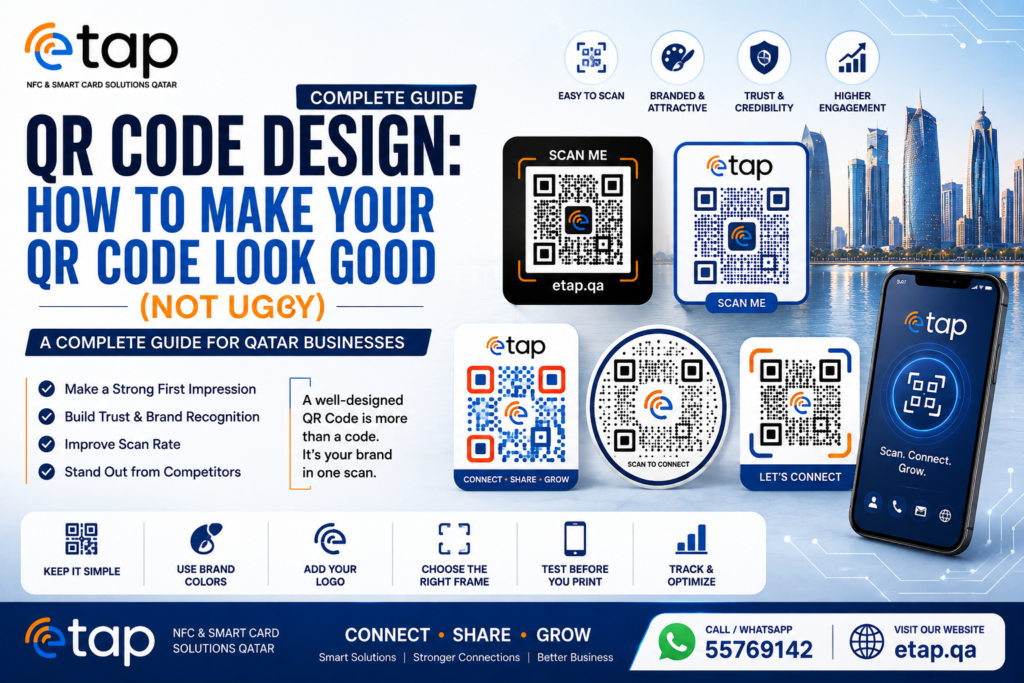
Contrast is non-negotiable. A QR code must have sufficient contrast between the dark modules and the light background to scan reliably. This doesn’t mean the code has to be black and white — dark navy on cream, deep green on white, or dark gold on ivory all work. What fails: low-contrast combinations like grey on light grey, or dark modules printed on a dark card background with insufficient differentiation.
Size matters for scan reliability. A QR code printed too small on a card reverse creates scan difficulty, especially in variable lighting. For a standard business card reverse, a QR code of at least 20mm × 20mm ensures reliable scanning across phone cameras and ambient lighting conditions. etap’s standard QR positioning on card reverses meets this threshold.
Error correction provides design flexibility. QR code standards include four levels of error correction (L, M, Q, H), which determine how much of the code pattern can be damaged or obscured while the code still scans successfully. At the highest correction level (H), up to 30% of the pattern can be covered or distorted — allowing a logo to be placed in the center of the code — while still scanning reliably. This is how branded QR codes with logos in the center are produced without breaking functionality.
Rounded vs square modules change the visual feel. The default QR code uses square data modules (the tiny individual squares that make up the pattern). Many professional QR generators allow the modules to be rendered as circles, rounded squares, or other shapes. Circular modules produce a softer, more design-friendly code that reads as intentional rather than technical. This is a small choice with a noticeable visual impact on a premium card.
Quiet zone: Every QR code requires a clear border of blank space around the pattern — called the quiet zone — for scanning cameras to correctly identify where the code begins and ends. A minimum quiet zone of four module widths on all sides is required for reliable scanning. Crowding additional design elements against the edge of a QR code risks scan failure in real-world conditions.
QR Codes on etap Products: What We Produce
Every etap card and acrylic stand that carries a QR code is produced with these principles applied:
Dynamic redirect: The QR codes on etap cards link through a clean short URL to your destination — profile page, Google review link, or any programmed URL. This keeps the physical code pattern clean and gives you flexibility to update the destination without reprinting.
Correct sizing: QR codes are sized appropriately for the card format — large enough for fast, reliable scanning without dominating the design.
Brand-consistent positioning: On PVC and metal cards, the QR code is placed in a position that complements the overall card layout rather than being an afterthought slotted wherever space permits.
Contrast verification: etap’s design team verifies QR code contrast against the card’s background color before production. Generic free tool outputs are checked and regenerated where scan reliability is at risk.
NFC + QR as a system: On every etap card, NFC and QR are complementary — not redundant. NFC serves users who tap instinctively; QR serves users who prefer scanning or whose NFC is disabled. Both resolve to the same destination. Neither is the “backup plan” — both are production-quality delivery methods.
Why Both Details Matter: The Complete Card Standard
A metal NFC business card represents an investment in your professional image. That investment pays off consistently when:
The card is clean and mark-free every time you hand it out — the result of a weekly microfibre wipe and a storage habit that keeps it away from metal friction.
The card looks as good at the handout as it did the day it arrived — the result of correct storage, no liquid exposure near the edges, and treatment that matches the finish.
The QR code on the reverse scans instantly, looks clean on the card surface, and opens the correct destination — the result of dynamic QR technology, correct sizing, and design-conscious production.
The NFC chip reads reliably first tap — the result of quality NTAG chip specification, correct programming, and chip protection through the card’s metal body construction.
None of these are difficult. They are the details that separate a card that delivers its value over years from one that looks tired and performs inconsistently within months.
etap designs, produces, and programs every metal NFC card at our Doha workshop to meet all of these standards from day one. The care and design principles in this guide extend that standard through the life of the card.
Frequently Asked Questions
Can I clean my etap metal card with regular soap and water? A small amount of mild soap diluted in water, applied with a soft cloth and immediately dried, is generally safe for metal cards. However, isopropyl alcohol on a microfibre cloth is the cleaner recommended method — it sanitises effectively, dries without residue, and poses no risk of water seeping into any edge seams on the card body. Avoid submerging the card in water.
Will my metal card scratch my phone? No. The card is held near the phone for a fraction of a second during an NFC read — there is no friction involved. The smooth flat surface of a metal card does not scratch phone glass under normal tap interaction.
How do I know if my QR code is static or dynamic? If you generated your QR code using a free online tool by entering your URL directly, it is almost certainly static. If you generated it through a QR management platform that provides a dashboard, redirect tracking, and the ability to change the destination URL, it is dynamic. etap uses dynamic redirects for all QR codes on our card products.
Can the QR code on my etap card be updated after printing? The redirect destination can be updated without reprinting if your etap card uses a dynamic QR setup. The physical code pattern on the card does not change — only the destination it redirects to. Contact etap to confirm whether your specific card setup supports dynamic redirection updates.
My QR code isn’t scanning reliably — what should check? First, confirm the quiet zone (clear border) around the code isn’t being obscured by case material, fingers, or another object. Second, check lighting — very low light makes QR scanning unreliable; move to a brighter environment. Third, try a different phone — some older camera apps scan more slowly than others. If the code consistently fails across multiple phones in good lighting, contact etap for an assessment of the code’s contrast and error correction level.
How often should I replace my metal card? etap metal cards have no functional end-of-life under normal use. The NFC chip is rated for 100,000+ reads. The metal substrate doesn’t degrade. Replace the card only when the physical condition has deteriorated beyond what cleaning can restore (typically from contact with keys over an extended period), or when your branding changes significantly enough to warrant a new design. Many etap clients use the same metal card for three to five years without replacement.
Conclusion
A premium metal NFC card from etap is built to make a lasting impression — and with the right care, it does exactly that for years. A weekly microfibre wipe, correct wallet storage away from metal contact, and the occasional isopropyl clean are all it takes to keep the finish in presentation condition.
The QR code on the reverse deserves the same design attention as the card face. Dynamic redirect technology, correct sizing, adequate contrast, and brand-consistent styling ensure that every scan is fast, reliable, and consistent with the premium impression the card was designed to create.
Both of these things — physical care and QR design quality — are small commitments. The return is a card that works at its full potential at every handout, for every contact, for as long as you carry it.
Order your custom metal NFC business card from etap today.
📱 WhatsApp: +974 55769142 📧 info@etap.qa 📍 Al Naif Souq, Ain Khaled, Doha, Qatar 🌐 etap.qa
Custom designed. Laser engraved. NFC + QR enabled. Produced in Doha.